Automated Warehouse Picking: Which System Is Right for Your Warehouse?
08/25/2025
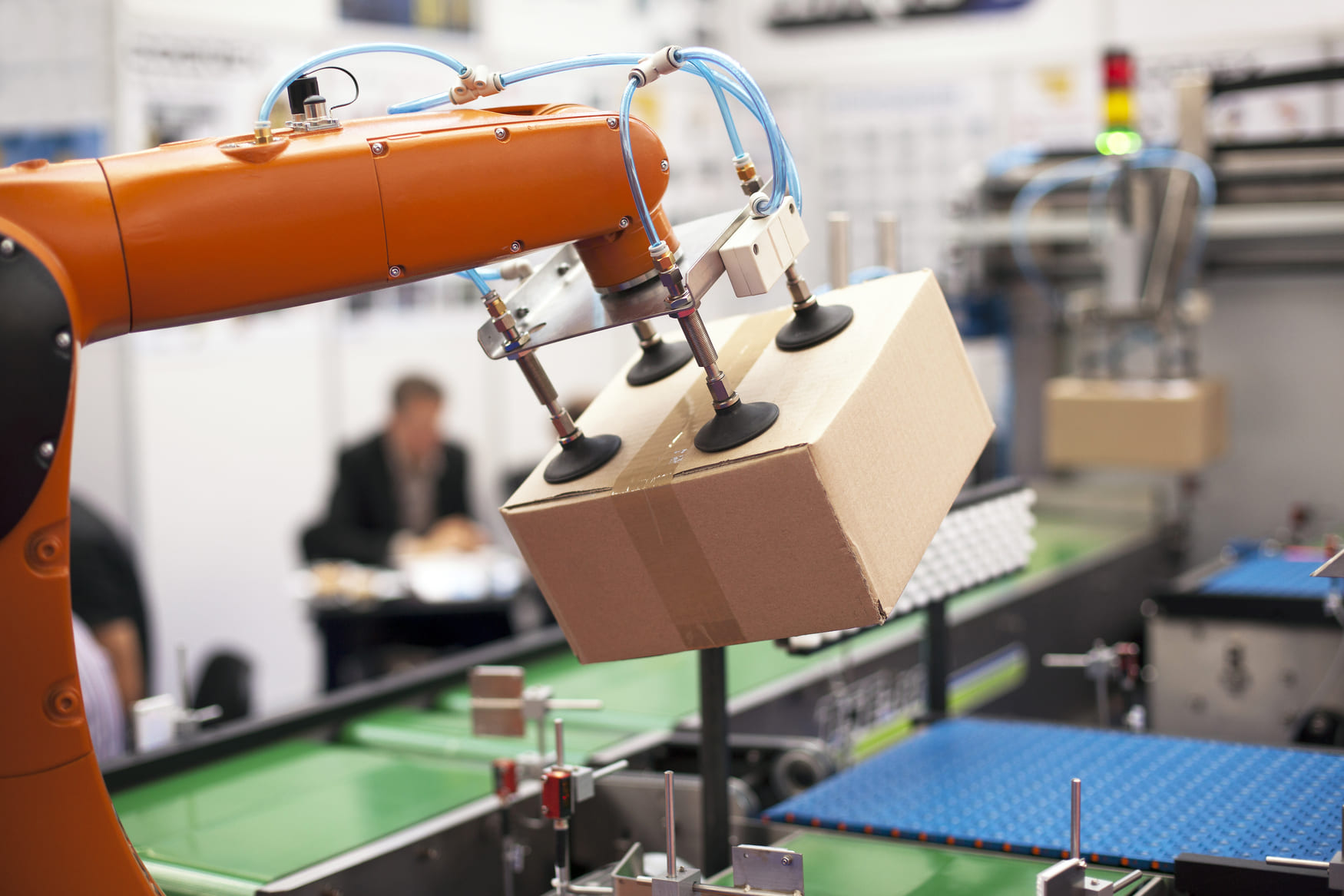
Automated warehouse picking uses software and equipment to automate parts of selecting and retrieving products for customer orders. Depending on the system, technology may guide a worker, transport inventory to a workstation, or physically pick individual items.
The right solution depends on where your operation loses time, which products you handle, and how orders move through the warehouse.
How Do Automated Picking Systems Work?
An automated picking system connects order information, inventory locations, picking instructions, and confirmation. A typical workflow includes:
- Release the order. Warehouse software receives the order and allocates available inventory.
- Assign the work. Tasks go to employees, workstations, or equipment based on locations and priorities.
- Retrieve the products. A worker follows instructions, equipment delivers a storage container, or a robot picks the items.
- Confirm the pick. Scans, operator confirmations, or integrated sensors record completion and identify exceptions.
- Send items onward. Picked products move into consolidation, packing, and shipping.
Picking technology also works alongside different warehouse order picking methods, including batch, zone, and discrete picking. These describe how work is organized; they do not, by themselves, describe automation.
Faster picking only helps if the remaining pick-and-pack process can handle the additional volume.
What Are the Main Warehouse Picking Technologies?
1. Barcode Scanning and Mobile Devices
Scanners and mobile computers display tasks and verify product or location identifiers against the order. They automate information capture while employees perform the physical picking.
They are worth evaluating when paper lists, look-alike products, or incorrect locations cause errors. Reliable labels and accurate product records remain essential. A scan confirms the information encoded on a label; quantity controls must also match the workflow.
Combine scanning with clear procedures for preventing warehouse mispicks.
2. Pick-to-Light and Put-to-Light Systems
Light-directed picking systems use illuminated displays to identify a picking location and quantity. Employees pick the products and confirm completion.
Put-to-light guides placement into an order container or compartment, helping separate items collected for multiple orders.
These systems suit work areas where clear visual instructions can reduce searching. Assess the number of locations, product turnover, and effort required to change the layout.
3. Voice-Directed Picking
Voice-directed picking delivers spoken instructions through a headset or wearable device. Workers confirm locations or actions verbally, with barcode verification added where needed.
This approach can reduce the need to consult a screen while handling products. Evaluate language support, background noise, device comfort, and how the system manages exceptions before deployment.
4. Goods-to-Person Systems and AS/RS
Goods-to-person picking brings inventory to a workstation where an employee selects the required items. An automated storage and retrieval system can support this process by storing and retrieving bins, trays, cases, or pallets.
Equipment may include shuttles, cranes, carousels, vertical lift modules, or storage robots. Each design has different load and layout requirements.
Goods-to-person describes the workflow; AS/RS describes storage and retrieval equipment. The terms overlap, but they are not interchangeable.
These systems can reduce travel and improve storage density. They still require replenishment, workstation capacity, and a plan for equipment downtime. Retrieving a tote automatically does not mean its individual items are picked automatically.
5. Autonomous Mobile Robots and AGVs
Autonomous mobile robots for picking can transport order containers and guide employees between tasks. Some systems move shelves or totes to workstations.
Many AMR applications automate travel while employees pick the products. Other designs combine a mobile base with a picking arm.
Automated guided vehicles, or AGVs, generally follow defined routes. AMRs use mapping and sensors to navigate more flexibly.
When evaluating either approach, check aisle traffic, load capacity, charging, and the handoff to packing. A larger robot fleet will not resolve a bottleneck at an overloaded workstation.
6. Robotic Piece-Picking Systems
Vision-guided robotic picking systems use cameras, software, and grippers to identify and move individual items.
A robot may pick products from a tote and place them into an order container or onto a conveyor. Suitability depends on the complete application, including product presentation and the selected gripper.
Test representative packaging, weights, shapes, and fragile items. Ask what happens after an unsuccessful grasp, an unreadable label, or a damaged product. Exceptions are part of the operating process and should be included in performance testing.
7. RFID and Vision Picking
RFID-based identification uses radio signals to read tagged products without direct line of sight. It can support inventory visibility and verification where tags, readers, and software are configured for the task.
Vision picking uses smart glasses to display instructions to employees. This differs from machine vision that guides a robot’s gripper.
Both technologies can support warehouse picking systems, but neither automatically provides physical item handling.
Which Warehouse Picking Solution Fits Your Operation?
Use the operational problem to build a shortlist:
| Main challenge | Technology to evaluate | What to validate |
|---|---|---|
| Wrong items or locations | Barcode verification | Label quality, product data, quantity checks |
| Too much searching in a picking zone | Pick-to-light or voice guidance | Location accuracy and worker usability |
| Long walks carrying orders | AMR-assisted picking | Traffic, container capacity, packing handoff |
| Excessive travel and limited storage space | Goods-to-person with suitable AS/RS | Load compatibility, replenishment, station capacity |
| Repetitive individual-item handling | Robotic piece picking | Product coverage, grasp success, exception rate |
This is a starting point for evaluation. A mixed operation may need more than one approach: guided manual picking for unusual products, goods-to-person stations for compatible inventory, and separate handling for full pallets.
What Benefits Can Automated Warehouse Picking Deliver?
A suitable system can improve:
- Travel efficiency: Inventory transport takes less employee time.
- Picking consistency: Instructions and verification reduce reliance on memory.
- Capacity: Work can be distributed across employees, stations, and equipment.
- Space utilization: Suitable storage automation can make better use of available height and density.
- Visibility: Recorded task completions help teams identify delays and exceptions.
Results depend on the starting process, product mix, and system design. Poor inventory records, empty pick locations, or slow packing can limit the value of faster picking.
How Do You Choose an Automated Picking System?
Understand Your Products and Order Patterns
Separate individual-item, case, and pallet requirements. Record product dimensions, weights, packaging, daily order lines, units per line, and seasonal peaks.
Identify which products account for most picking activity. Also review whether batch or cluster picking could reduce repeated travel before specifying equipment.
Confirm Software Integration
Your warehouse management system manages inventory and fulfillment tasks. Depending on the design, warehouse execution or control software coordinates work and equipment.
Map order releases, inventory updates, replenishment triggers, and exception messages before choosing a system. Avoid common WMS selection mistakes by testing actual workflows and integration requirements.
Check the Whole Operation
Include receiving, replenishment, consolidation, packing, and shipping in the capacity review. For high-volume fulfillment, test peak demand alongside normal operating conditions.
Ask suppliers to report sustained performance with your product mix, including downtime and exceptions. Keep the measurement consistent: units per hour, order lines per hour, and completed orders per hour measure different things
How Much Do Automated Warehouse Picking Systems Cost?
There is no single price that applies across automated picking systems. A scanner rollout, mobile robot deployment, and integrated AS/RS project involve different equipment, software, and installation work.
Request a proposal that separates:
- Equipment purchase, lease, or subscription charges.
- Software licenses and integration.
- Facility changes and installation.
- Training and operational ramp-up.
- Maintenance, spare parts, energy, and support.
- Ongoing labor for replenishment and exceptions.
Compare these costs with achievable labor savings, fewer picking errors, and the value of additional usable capacity.
For an initial estimate:
Simple payback period = total initial investment ÷ annual net operating savings.
Calculate net savings after recurring costs. Treat this as a screening calculation: changing volumes, ramp-up time, and financing can affect the full business case.
How Can You Introduce Automation Without Disrupting Fulfillment?
Start with a defined workflow and measurable acceptance criteria:
- Fix inventory foundations. Review labels, product records, locations, and the warehouse receiving process.
- Record a baseline. Measure picking accuracy, labor hours, order turnaround time, and cost per order.
- Pilot representative work. Include difficult products, peak conditions, replenishment, and exceptions.
- Train the team. Cover routine operation, safe equipment interaction, maintenance responsibilities, and recovery procedures.
- Expand after validation. Confirm that improvements continue through packing and shipping before adding capacity.
Maintain a documented response for equipment or software outages so the team knows how to recover outstanding orders.
Need a Warehouse That Fits Your Fulfillment Requirements?
OLIMP helps businesses connect with warehousing and fulfillment partners. Share your product details, order volume, preferred locations, and required integrations to help identify a suitable facility.
Confirm picking methods, available technology, capacity, and service expectations with the selected partner before booking.
Frequently Asked Questions (FAQ) – OLIMP Warehousing
Q: What Is Automated Warehouse Picking?
Automated warehouse picking uses software and equipment to perform or support order-picking tasks. Systems may guide employees, move inventory to workstations, or use robots to select and transfer individual products.
Q: What Is the Difference Between Assisted and Fully Automated Picking?
Assisted picking uses tools such as scanners, lights, or voice instructions while people handle products. Fully automated item picking uses equipment to perform the physical selection and transfer within a defined workflow. Other warehouse tasks may still need employees.
Q: Are Goods-to-Person Systems the Same as Robotic Picking Systems?
No. Goods-to-person systems deliver inventory to a workstation, often for a human to pick. Robotic piece-picking systems grasp and transfer individual products. A warehouse can combine both technologies.
Q: Can Automated Picking Systems Handle Every Product?
Product suitability must be tested. Dimensions, weight, surface material, packaging, and fragility affect handling. A system that works well with rigid cartons may need different equipment or manual handling for other products.
Q: Can Small Warehouses Use Picking Automation?
Yes. Smaller operations can evaluate barcode-guided workflows, voice picking, or automation in one work area. The decision should depend on the problem being solved, expected utilization, and total cost.
Q: How Do You Measure Picking Accuracy?
Divide correctly picked order lines by all picked order lines, then multiply by 100. Define a correct line consistently, including the required product, quantity, and any relevant lot or serial number. Track order-level accuracy separately.
Q: Does Warehouse Picking Automation Replace Employees?
It can reduce labor needed for particular tasks and change staffing requirements. Many deployments still rely on employees for replenishment, unusual products, quality checks, maintenance, and exception handling. Assess these roles when planning capacity.
You may be interested in
Best Practices for Warehouse Receiving Processes
Warehouse receiving is the essential first step of warehouse operations – it encompasses everything from unloading inbound deliveries to updating inventory records. In practice, an effective warehouse receiving process means checking in, inspecting, and storing all incoming goods promptly and accurately. How inventory is received at a warehouse sets the tone for the rest of […]
Improve Supply Chain Efficiency with Smarter Warehousing
Efficient supply chain management is essential for any business aiming to remain competitive in today’s fast-paced market. In this article, we will explore how optimizing warehousing plays a crucial role in enhancing supply chain efficiency. From inventory management to technological advancements, we will cover various strategies that can help streamline operations and improve overall performance […]
Pick & Pack Warehousing: Complete Guide to Efficient E‑Commerce Fulfillment
Pick‑and‑pack warehousing is an order‑fulfillment method in which warehouse staff pick specific products from inventory and pack them for shipment. A warehouse management system (WMS) generates a picking list after a customer places an order, guiding workers to collect the right items, choose appropriate packaging materials and prepare parcels for shipping. This process typically follows […]
Ready to streamline your warehousing needs?
Request a quote today and discover how OLIMP's tailored solutions can optimize your operations