What Is Batch Picking in Warehousing? A Complete Guide to Faster Fulfillment
04/10/2026

- Batch picking groups orders that share similar SKUs so a picker can collect all items in a single trip. This cuts down on walking, boosts productivity and reduces labor costs. The trade‑off is that items must be sorted into individual orders after picking.
- Cluster picking assigns each order to its own tote or bin. Pickers travel a route once, placing items directly into the correct bin, so there’s no post‑pick sorting. This method is ideal for e‑commerce and small‑line orders where speed and simplicity matter.
- Choose batch picking when there is high overlap between orders and you have the staff or automation to handle sorting. Choose cluster picking when orders are small, travel distances are long, or congestion is an issue.
- Both strategies rely on technology like a warehouse management system (WMS) to group orders, optimize routes and track inventory. Investing in robust software and training is essential for success.
- Hybrid approaches, such as combining batch picking with zone or wave picking, let warehouses adapt to different order profiles and seasonal peaks.
Speed and accuracy in order fulfillment have become competitive differentiators. E‑commerce customers expect same‑day shipping and error‑free deliveries. Traditional pick‑to‑order methods can be inefficient when volumes rise because pickers walk miles to collect items one order at a time. Two techniques, batch picking and cluster picking, promise to streamline the process by letting a single picker handle multiple orders in one pass. This article explains how each method works, compares their pros and cons, and offers guidance on when to use them.
What Is Batch Picking?
Batch picking (also called fulfillment batching) is an order‑fulfillment method in which a worker collects items for multiple orders simultaneously. Instead of picking one order at a time, the picker groups orders with identical or similar SKUs and retrieves all needed items in a single trip. This approach reduces repetitive trips through the warehouse, cuts down on travel time, and allows fulfillment teams to process more orders in less time.
How Batch Picking Works
Implementing batch picking requires careful organization and the right technology. The typical process includes these steps:
- Group orders: Orders are grouped based on shared SKUs or proximity within the warehouse. A WMS/OMS can automatically batch orders containing the same items or similar pick paths.
- Generate a consolidated picking list: The WMS or OMS produces a list detailing all SKUs, quantities and storage locations for the batch.
- Assign and prepare pickers: Pickers receive the pick list and gather any necessary tools such as totes, carts and barcode scanners. Some warehouses use voice‑picking headsets for hands‑free navigation.
- Follow the optimized pick path: The picker travels the warehouse once, collecting items for all orders in the batch using the route calculated by the WMS.
- Sort and pack: After collecting all items, the batch is brought to a designated sorting area where items are separated into their respective orders and prepared for shipping.
This systematic approach means pickers walk fewer miles per day, an important factor given that warehouse employees can walk up to 10 miles per shift. By consolidating travel, batch picking maximizes the productive time spent picking items rather than walking between aisles.
Benefits of Batch Picking
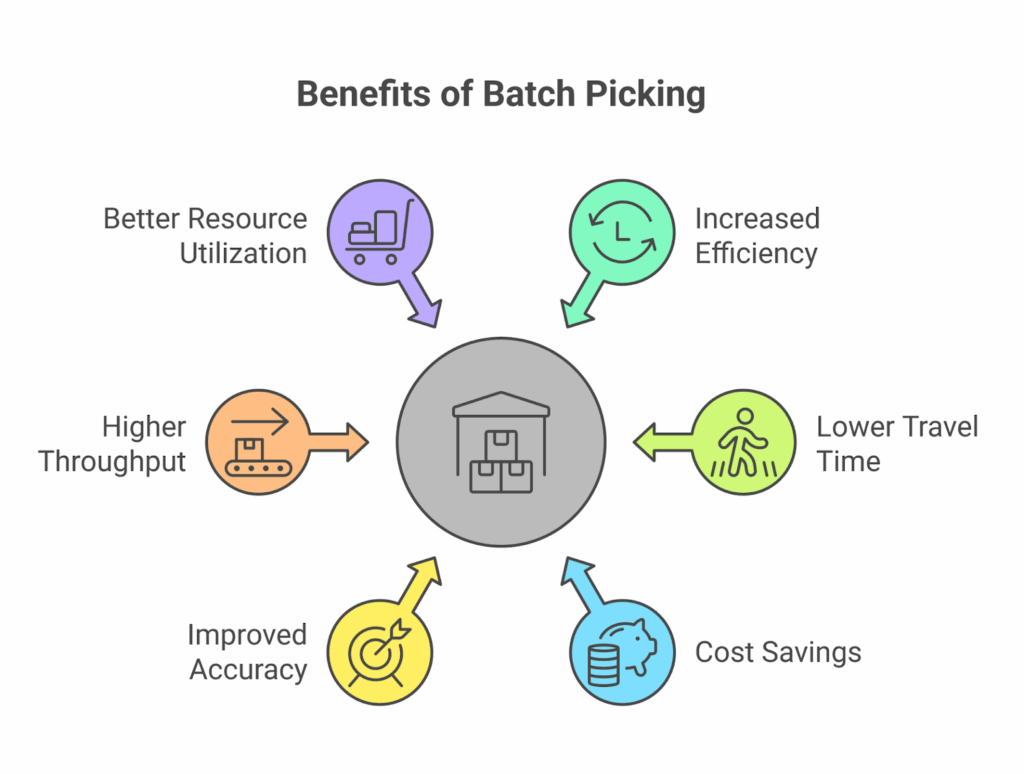
- Reduced travel distance – Grouping orders into a batch means pickers walk fewer miles per shift and spend more time picking and less time walking.
- Higher productivity – Handling multiple orders at once increases the number of lines picked per hour without expanding staff.
- Lower labor costs – Fewer trips and more efficient routes reduce overtime and minimize the need for additional pickers during peak seasons.
- Better throughput – Optimized routes and consolidated picking lists help orders move from picking to packing faster.
- Improved accuracy – With one SKU picked in bulk, pickers can focus on verifying quantities and quality, lowering error rates.
When to Use Batch Picking
Batch picking is best suited for high‑volume operations where many orders share identical or similar items. It works well for subscription boxes, promotional launches and crowdfunding rewards where dozens of customers order the same SKU. However, because items must be sorted after picking, it requires additional labor or automation. If orders vary widely or sorting resources are limited, other strategies may be more efficient.
What Is Cluster Picking (Meaning and Process)?
Definition
Cluster picking is an order‑fulfillment strategy where a picker collects items for several orders at once, but each order is kept in its own tote or bin. Cluster picking “groups similar customer orders into clusters based on SKU overlap, item location or optimized pick paths” and allows staff to pick four to eight orders simultaneously. Because items are placed into separate bins during picking, no additional sorting is required.
How Cluster Picking Works
- Order clustering – A WMS analyzes incoming orders and groups them by proximity, SKU similarities or route efficiency.
- Route optimization – Software calculates the shortest path through the warehouse.
- Multi‑order picking – Pickers use multi‑bin carts to collect items for several orders in one pass.
- Real‑time scanning – As items are picked, they are scanned and placed directly into the correct bin, eliminating the need for sorting later.
- Direct to packing – Once the cluster is complete, bins go directly to packing, improving throughput.
Benefits of Cluster Picking
- No post‑pick sorting – Since each order is separated during picking, items arrive at the packing station ready to ship.
- Reduced travel time – Pickers handle multiple orders per trip, cutting travel distance by an estimated 25–40 percent.
- Higher picks per hour – In optimized setups, cluster picking can double the picks‑per‑hour compared to single‑order picking.
- Lower labor costs – With no sorting step and higher productivity, labor cost per order decreases.
- Improved accuracy – Sorting during the pick reduces errors; some operations report error rates below 0.5 percent.
- Better suited for e‑commerce – Cluster picking excels when orders are small (1–2 lines) and volumes are high.
When to Use Cluster Picking
Cluster picking is ideal for e‑commerce warehouses processing dozens or hundreds of small orders per day. It shines when travel distances are long or aisles are narrow and congested. Because sorting happens during picking, less floor space and fewer staff are needed in the sorting area. However, cluster picking requires multi‑bin carts, WMS software and training. It may not be the best choice when orders contain many lines or cart capacity is limited.
| Aspect | Batch Picking | Cluster Picking |
|---|---|---|
| Sorting step | Items are collected into one container and sorted after picking. This requires a separate sorting area and staff. | Items are placed into separate bins during picking, so no post-pick sorting is needed. |
| Travel efficiency | Reduces travel when orders share similar SKUs. It works best when there is high overlap between orders. | Reduces travel by allowing pickers to collect several orders in one route using multi-bin carts. |
| Labor requirements | May require fewer pickers, but additional labor is often needed for sorting after picking. | Requires less sorting labor because pickers separate orders during the picking process. |
| Best order type | Best for orders with identical or similar SKUs, bulk pulls, cases, or high-volume repetitive orders. | Best for small e-commerce orders, especially single-line or two-line orders with fast fulfillment needs. |
| Infrastructure | Often needs a sorting area, put walls, conveyors, or additional sorting workflows. | Needs multi-bin carts, barcode scanners, and a WMS that can assign orders to bins. |
| Main advantage | Saves walking time by collecting similar items for many orders in one trip. | Saves time by combining picking and sorting into one step. |
| Main limitation | Post-pick sorting can create delays, errors, or extra labor costs. | Cart capacity can limit how many orders a picker can handle at once. |
Which Method Should You Choose?
- Pick batch picking when volumes are consistently high, many orders share the same fast‑moving SKUs, and you can justify a sorting area and staff. It also suits case picking or bulk pulls where each stop collects large quantities.
- Pick cluster picking when your operation handles many single‑ or two‑line orders, labor costs are a concern, or floor congestion makes in‑aisle sorting more efficient.
- Hybrid strategies are common. You can cluster pick within zones, switch to batching during peak periods or combine both with wave picking. A digital twin or simulation can help determine break‑even volumes.
Challenges and Considerations
Batch Picking
- Order variability – Diverse SKU combinations make it harder to group orders efficiently, which can negate travel savings.
- Batch size trade‑offs – Too large a batch causes congestion and long sorting times; too small a batch reduces efficiency gains.
- Technology requirements – Effective batching depends on a robust WMS to group orders and optimize routes; manual batching can lead to errors and delays.
- Labor coordination – Sorting requires trained staff and clear communication; mis‑sorted items can delay shipments and increase returns.
Cluster Picking
- Cart capacity – Multi‑bin carts have limited compartments; if orders contain many lines or items, carts fill quickly.
- Investment in carts & equipment – Quality carts, bins, scanners and WMS licenses represent upfront costs.
- Training – Pickers must learn to scan and place items correctly; mis‑placing an item in the wrong bin can compromise accuracy.
- SKU overlap – If orders rarely share SKUs, cluster picking yields fewer travel‑time savings compared to discrete picking.
Best Practices for Implementing Batch Picking
Whether choosing batch or cluster picking, follow these tips to maximize success:
- Assess suitability – Analyze order volumes, SKU overlap and current picking performance to determine which strategy suits your operation.
- Invest in technology – Implement a modern WMS or OMS capable of batching or clustering orders, route optimization and real‑time inventory tracking.
- Optimize layout – Place fast‑moving SKUs in forward locations, design aisles for efficient routes and ensure adequate space for carts or sorting areas.
- Provide training – Teach pickers how to use scanners, carts and WMS workflows; emphasize accuracy and process adherence.
- Pilot and monitor – Start with a pilot program, track key metrics such as picks per hour, travel time and error rates, and adjust batch or cluster sizes accordingly.
- Stay flexible – Use hybrid strategies (e.g., cluster in forward pick zones and batch in bulk storage) to adapt to seasonal peaks or changes in order profiles.
Conclusion
Efficient order fulfillment is essential for customer satisfaction and profitability. Batch picking and cluster picking both enable pickers to handle multiple orders in a single trip, reducing travel time and labor. The primary difference lies in when items are sorted: after picking in batch picking, or during the pick in cluster picking. By understanding the strengths and limitations of each method, investing in technology and training, and adopting hybrid strategies where appropriate, warehouses can accelerate fulfillment and meet rising customer expectations.
Frequently Asked Questions (FAQ) – OLIMP Warehousing
Q: What is the difference between batch picking and cluster picking?
Batch picking groups orders with similar SKUs so a picker can collect items in one run, then sorts them afterward. Cluster picking assigns each order to its own bin and sorts during the pick, eliminating the need for post‑pick sorting.
Q: When should you use batch picking?
Batch picking is best when multiple orders share many of the same SKUs or require case‑quantity picks. It reduces travel and labor, but you need a sorting area and staff to divide items after picking.
Q: What are the advantages of cluster picking?
Cluster picking reduces travel time by up to 40 percent, doubles picks per hour and eliminates post‑pick sorting by placing items directly into bins. It’s particularly suited to high‑volume e‑commerce operations with small orders.
Q: Is cluster picking more efficient than batch picking?
It depends on your operation. Cluster picking often has lower cycle times and labor requirements because sorting happens during the pick. Batch picking can be more efficient for high‑overlap orders or when pulling large cases.
Q: Do you need a WMS for batch or cluster picking?
Yes. A warehouse management system groups orders, generates pick lists, optimizes routes and tracks inventory. Without one, the complexity of batching or clustering quickly overwhelms manual systems.
Q: Can you combine batch picking with other methods?
Absolutely. Many warehouses use hybrid strategies – e.g., cluster picking within zones and batch picking in bulk storage- to balance efficiency and flexibility. Simulation tools or digital twins can help identify the best mix.
Q: What kind of carts are used for cluster picking?
Multi‑bin carts with six to twelve compartments allow pickers to place items for different orders directly into separate bins. Ergonomic design and mobility are key considerations.
You may be interested in

4PL Logistics: The Ultimate Guide to Fourth-Party Logistics
Fourth-party logistics (4PL) refers to hiring a single partner to integrate and manage an entire supply chain. In practice, a 4PL provider acts as a strategic supply chain integrator, overseeing transportation, warehousing, inventory, and fulfillment on behalf of a company. In other words, businesses outsource their full logistics management to one expert who coordinates multiple […]
Backorder vs Out of Stock: Meaning, Differences & Management Strategies
Backorder vs Out of Stock – these two terms can be a source of confusion for consumers and a critical decision point for businesses. If you’ve ever tried to buy something online and seen it listed as “out of stock,” you know the disappointment of not being able to order it. On the other hand, […]

Best Practices for Warehouse Receiving Processes
Warehouse receiving is the essential first step of warehouse operations – it encompasses everything from unloading inbound deliveries to updating inventory records. In practice, an effective warehouse receiving process means checking in, inspecting, and storing all incoming goods promptly and accurately. How inventory is received at a warehouse sets the tone for the rest of […]
Ready to streamline your warehousing needs?
Request a quote today and discover how OLIMP's tailored solutions can optimize your operations